Saturday, October 10, 2009
Tuesday, October 6, 2009
More Experiments with Digital Collage

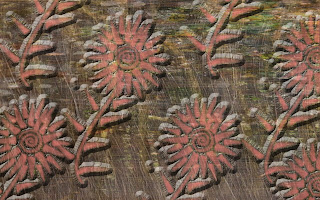
For the background on this image, I used a copy of an altered photo I had done in Artful Journaling class. It was a photo I took on a nature walk in Hawaii several years ago, which I altered using bleach, sandpaper, and who knows what else. The flowers were "stamped" on the background using the digital brush I made last week from my flower drawing. I then applied a beveled effect to the flowers to make them stand out.
I'm finding that all this Photoshop experimentation is refueling my regular (non-digital) art-journaling creativity. Often, after I tear myself away from the computer, I'm in the mood to cut, paste, glue, and draw. Who knew?
Sunday, October 4, 2009
Text Effects

I've been experimenting some more today (in addition to trying to resolve a big problem with my scanner-- no luck on that so far). Here are some neat text effects I got by using the Text Mask (or is it Mask Text?) feature. You can "cut out" the shape of the letters from a patterned or colored background and move them to another document. Here I used an animal print patttern, a scan of French dictionary text, and a photo of the ocean. That's all for today. I'm going to tear myself away from this computer now.
Friday, October 2, 2009
More Brush Play: Coexist

I've been practicing turning my own images (drawn or lettered) into custom PE5 brushes, so I can use them whenever and wherever I want in a digital composition. It occurred to me that I could try making my brush lettering and doodles (learned in Martha Lever's online Calligra-Fun class) into custom brushes. After some trial and error, I started getting pretty good results. For the image shown here, I made a brush out of the lettered word "Coexist" (I think I posted this in its original form some time ago) and stamped it three times in different colors and modes. Wow, I learn something new every day :).
Tuesday, September 29, 2009
Playing with Paisley Brushes

I've been trying to figure out how to make my own custom PE5 "brushes." This means that I can take any image (e.g., one I've created myself) and make it into a "stamp" that can be placed anywhere I want in a digital collage I'm creating. I've had mixed success with this process. For some reason, some of the brushes keep disappearing. But I managed to create (and save) some brushes made from drawings of paisley patterns that I did a few years ago. I made two PE5 patterns from these brushes, and added a few other small images from a free brush set I'd downloaded. I then layered the patterns and applied a blending mode, to produce the image shown here.
Friday, September 25, 2009
Paisley Bird
Thursday, September 24, 2009
Four Corners of the Ocean

This was an interesting experiment. I created a digital collage, using scans of elements from the ocean-themed altered books I've made. I then made several versions of the same collage and applied different blending effects to each one. In several steps, I then combined and layered them into the result you see here.
Subscribe to:
Posts (Atom)

