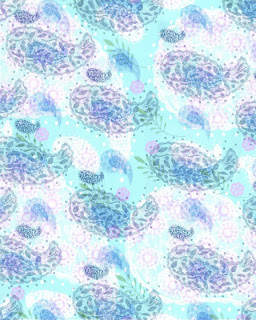
 I've been trying to figure out how to make my own custom PE5 "brushes." This means that I can take any image (e.g., one I've created myself) and make it into a "stamp" that can be placed anywhere I want in a digital collage I'm creating. I've had mixed success with this process. For some reason, some of the brushes keep disappearing. But I managed to create (and save) some brushes made from drawings of paisley patterns that I did a few years ago. I made two PE5 patterns from these brushes, and added a few other small images from a free brush set I'd downloaded. I then layered the patterns and applied a blending mode, to produce the image shown here.
 This is a PE5 collage in which I melded a bird and egg image with some paisley patterns I'd created some time ago. I also added embellishments and color/blending effects. I'm happy with the way it turned out!
 This was an interesting experiment. I created a digital collage, using scans of elements from the ocean-themed altered books I've made. I then made several versions of the same collage and applied different blending effects to each one. In several steps, I then combined and layered them into the result you see here.
 A new digital collage based on family photos, and scans of some of my sketches (plus the owl--he's not related to us). The best thing about digital collage is not having to clean up a mess afterward!
 Here's my latest PE5 attempt, using my own lettering (scanned), and a butterfly wing image from graphicsfairy.blogspot.com/ that I altered. The background is an image from scrapgirls.com. These sites have images that can be downloaded- free!
 May everyone celebrating the Jewish New Year have a happy, healthy, safe, and prosperous year.
 I'm still playing in Photoshop Elements (hereafter referred to as PE5), despite lots of other (more important?) things to do. I discovered ways to create more effects! This is my last experiment for tonight.


